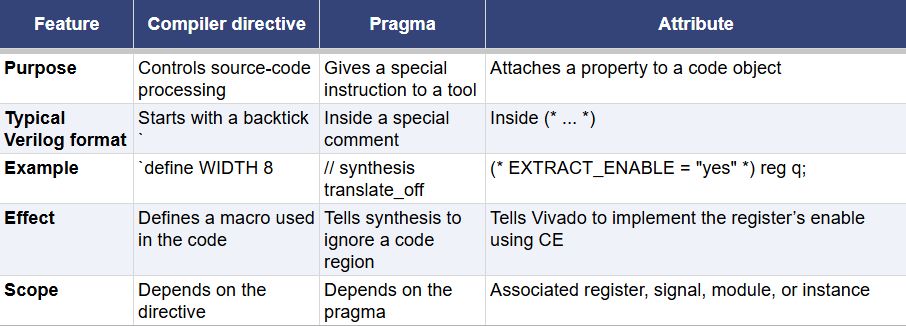
Directives, Pragmas and Attributes in Vivado

When we work with EDA tools like Vivado, we often need to improve code readability. #1] Complex code can be placed in a separate file and included wherever required, allowing us to focus on the main design - Directives
#2]We may also want to control how the tool handles a specific portion of code - Pragma
#3] Override its default implementation choices - Attributes
Compiler directives help control how source code is processed. For example, suppose we have written code for a register file that stores 16 bytes of data. We can place this code in a separate file and include its contents wherever required using the `include directive.
Next, we have pragmas, which give tools special instructions for handling specific portions of code. For example, if we have added debugging code and want to exclude it during synthesis, we can place // synthesis translate_off before the debugging code and // synthesis translate_on after it. These pragmas tell the synthesis tool to ignore the enclosed code.
Finally, attributes control how tools handle objects described in the code, such as registers, signals, or modules. For example, when working with a CDC synchronizer, we can use ASYNC_REG to identify the synchronizer registers and encourage Vivado to place them close together. Similarly, we can apply (* EXTRACT_ENABLE = "yes" *) to a register to tell the synthesis tool to implement its enable behavior using the flip-flop’s CE pin.
The easiest way to recognize their common Verilog formats is that compiler directives start with a backtick, such as `define WIDTH 8; pragmas appear inside special comments, such as // synthesis translate_off; and attributes are written between (* and *).